
By Advit
15 min read
Create Stunning Festival Photos Using ChatGPT
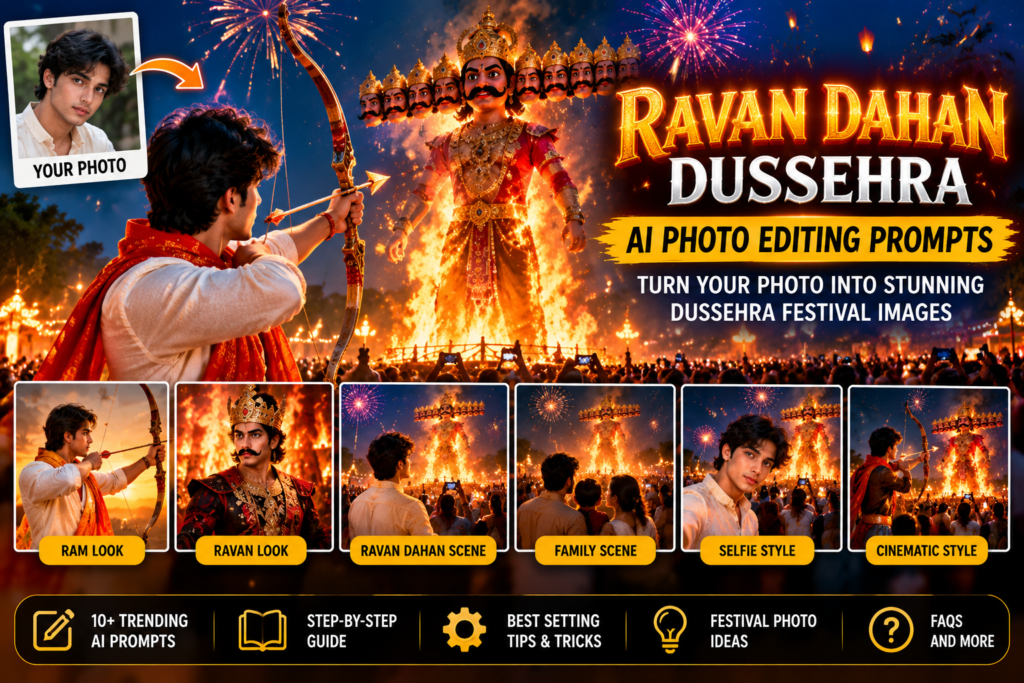
Dussehra, also known as Vijayadashami, is a festival that celebrates the victory of good over evil. One of the most recognizable traditions associated with Dussehra in many parts of India is Ravan Dahan, the ceremonial burning of effigies of Ravana. The event is often celebrated with fireworks, festive gatherings, traditional clothing, and vibrant nighttime scenes.
If you want to create memorable Dussehra photographs in 2026, AI image generation can help you turn an ordinary selfie or portrait into a cinematic festival-inspired image. With ChatGPT image generation, you can explore creative scenes featuring Ravan Dahan celebrations, traditional Indian outfits, dramatic skies, glowing lights, and festive decorations.
You do not need advanced photo-editing skills to get started. Upload your own photograph when image editing is available, describe the look you want, and use a detailed prompt to guide the result.
In this guide, you will discover 12 Ravan Dahan and Dussehra AI photo editing prompts for 2026, along with step-by-step instructions for using ChatGPT, realistic editing tips, common mistakes, and SEO-friendly publishing details.
What Is Ravan Dahan AI Photo Editing?
Ravan Dahan AI photo editing uses artificial intelligence to create or transform images inspired by Dussehra celebrations. You can combine a personal photograph with a festive background, traditional clothing, dramatic lighting, and a symbolic Ravan Dahan scene.
For example, you can create:
A traditional Dussehra portrait with a Ravan effigy in the background.
A cinematic Ram-inspired festive look with a bow and arrow.
A colorful nighttime festival scene with fireworks.
A family portrait at a Dussehra fair.
A traditional Indian outfit photoshoot with festive lighting.
A dramatic festival poster featuring your portrait.
A realistic selfie-style image with a Dussehra celebration behind you.
These prompts are creative starting points. AI-generated results may not reproduce every detail exactly, so review the final image before sharing it.
How to Use ChatGPT for Ravan Dahan Photo Editing
ChatGPT can help generate or edit images from natural-language instructions when image generation and image editing are available in your interface.
Step 1: Open ChatGPT
Open ChatGPT and start a new conversation. Use the image generation feature if it is available to you.
Step 2: Upload your photo
Select a clear selfie, portrait, or full-body photograph if you want to use your own appearance as a reference. Choose a picture with good lighting and a clearly visible face.
Step 3: Copy a prompt from this article
Select the prompt that matches your preferred style, such as a traditional Dussehra portrait, a Ravan Dahan background, or a cinematic festival photograph.
Step 4: Ask ChatGPT to edit your photo
Paste the prompt and make it clear that you want to edit the uploaded photograph rather than create an unrelated person. Ask it to preserve your recognizable facial features if that is important.
Step 5: Review and refine the image
Check the facial details, clothing, hands, background, and lighting. If necessary, give ChatGPT another instruction to correct the specific details that need improvement.
Step 6: Save your image
When you are happy with the result, use the available image-saving option. Choose an appropriate crop for your social media post, profile picture, or festive greeting.
12 Best Ravan Dahan Dussehra AI Photo Editing Prompts for 2026
The following prompts are designed for creative image generation and photo editing. If you upload your own picture, keep the instruction about preserving your facial identity. Adjust the outfit, colors, and scene to match your preferences.
1. Ravan Dahan Festival Portrait Prompt
2. Ram-Inspired Dussehra Traditional Look Prompt
3. Ravan Dahan Night Photography Prompt
4. Ravan Dahan Selfie Editing Prompt
5. Traditional Kurta Dussehra Portrait Prompt
6. Dussehra Couple Photo Editing Prompt
7. Dussehra Family Festival Portrait Prompt
8. Cinematic Ravan Dahan Poster Prompt
9. Ravan Dahan Golden Hour Portrait Prompt
9. Ravan Dahan Golden Hour Portrait Prompt
10. Dussehra Festival Crowd Portrait Prompt
11. Traditional Indian Royal Dussehra Look Prompt
12. Viral Dussehra Instagram Portrait Prompt
Extra Prompt: Create a Dussehra Greeting Image in ChatGPT
If you want a festival greeting rather than a personal portrait, try this prompt.
Copy-paste prompt:
“Create a beautiful Dussehra greeting image inspired by the celebration of Vijayadashami. Include an artistic Ravan Dahan scene in the distance, a glowing evening sky, decorative diyas, marigold flowers, and elegant traditional Indian design elements. Use warm gold, saffron, orange, and deep blue colors. Leave clear, uncluttered space for the greeting text ‘Happy Dussehra 2026’ to be added separately. Make the composition polished, festive, culturally respectful, and suitable for sharing on social media.”
Tip: Adding greeting text after image generation can help you control spelling, typography, and layout.
Tips for Getting Better Dussehra AI Photo Editing Results
A detailed prompt should describe the scene you want while explaining which parts of the original photo should remain unchanged.
1. Start with a clear photo. Use a well-lit selfie or portrait with a clearly visible face.
2. Describe the setting. Specify whether you want a sunset scene, a nighttime celebration, a festival crowd, or a cinematic poster.
3. Keep the face recognizable. Ask the AI to preserve your facial features, hairstyle, skin tone, and expression. Results can vary, so check the generated image.
4. Choose traditional clothing details. Mention a kurta, sherwani, saree, or another outfit, along with the preferred colors and fabrics.
5. Keep the Ravan effigy in the background when appropriate. This can create a more balanced composition while keeping attention on your portrait.
6. Describe realistic lighting. Golden highlights, warm festival lights, and deep blue evening shadows can create a cinematic appearance.
7. Avoid excessive effects. Too much smoke, fire, or glow can obscure the subject and make the image look artificial.
8. Review the final image. Check the face, hands, clothing, background figures, and any text before sharing.
Common Mistakes to Avoid
Changed facial features: Request identity preservation and use a reference image when available.
Unnatural hands or props: Review the bow, arrows, fingers, and clothing details carefully.
Overly bright fire effects: Ask for controlled highlights and realistic lighting.
Unclear backgrounds: Specify the location of the effigy and the subject.
Distorted text: Add titles and greetings separately if the generated lettering is inaccurate.
Overcrowded compositions: Focus on one main subject and a few clear festival elements.
Unrealistic crowd scenes: Ask for natural crowd silhouettes and believable perspective.
Misleading event imagery: If the image is AI-generated, do not present it as a genuine photograph of a real event.
For safety and realism, keep any depicted public celebration at a reasonable distance from flames and fireworks.
Best Ways to Share Your Dussehra AI Photos
You can adapt these images for different platforms:
Instagram: Use a square portrait or vertical story layout with a clear subject.
Facebook: Share a festive portrait, couple image, or family photograph.
WhatsApp status: Choose a vertical image with a simple, festive composition.
Pinterest: Use a portrait or poster layout with room for a title.
Festival greeting cards: Add a greeting such as “Happy Dussehra” after generating the background.
Blog featured images: Use a wide landscape image and add a clear headline using your image editor.
Choose the dimensions based on the platform and preview the final crop before posting.
Frequently Asked Questions
1. What is Ravan Dahan?
Ravan Dahan is a Dussehra tradition observed in many parts of India in which effigies of Ravana are ceremonially burned. The event is commonly associated with the victory of good over evil.
2. Can I create Ravan Dahan photos using ChatGPT?
Yes. When image generation or editing is available, you can upload a photo and describe the festival scene you want. ChatGPT can help generate or edit an image according to your instructions.
3. Can I use my own selfie for Dussehra AI editing?
Yes. Upload a clear selfie and use a prompt that asks the AI to preserve your recognizable appearance while changing the outfit, background, and lighting.
4. Which prompt is best for a Ravan Dahan festival portrait?
The Ravan Dahan Festival Portrait Prompt is a good starting point. It combines traditional clothing, a distant Ravan effigy, festive lighting, and fireworks.
5. Can I create a Ram-inspired Dussehra photo?
Yes. Use the Ram-Inspired Dussehra Traditional Look Prompt to explore a respectful festive portrait with traditional clothing and a symbolic bow.
6. Can I create Dussehra couple and family photos?
Yes. The couple and family prompts are designed to create festive group portraits while asking the AI to preserve each person’s recognizable appearance.
7. How can I make my AI festival photo look realistic?
Use a clear reference image, describe lighting and clothing precisely, keep the scene uncluttered, and ask for natural skin texture and realistic perspective. Review the result for unwanted changes.
8. Can I use the generated images on Instagram and WhatsApp?
Yes. You can use suitable images for social media posts, stories, and status updates, subject to the relevant platform rules and your rights to the original image.
9. Can I create a Happy Dussehra greeting poster with ChatGPT?
Yes. Describe a festive background with a Ravan Dahan scene, diyas, flowers, and warm colors. For precise spelling and typography, add the greeting text after generating the image.
10. Can I use AI-generated Dussehra images commercially?
Commercial use depends on the tool’s terms, the rights to the original photo, and applicable rules concerning likenesses, trademarks, and copyrighted material. Check the relevant terms before using an image commercially.
Conclusion
Ravan Dahan and Dussehra offer beautiful inspiration for festive photography, traditional portraits, family memories, and creative greeting images. With ChatGPT image generation and detailed prompts, you can explore different styles, from realistic festival portraits to cinematic posters with glowing lights and colorful fireworks.
Try the 12 copy-and-paste prompts in this guide, upload a clear photo when editing an existing image, and refine the result with specific instructions. For the most natural appearance, preserve your recognizable facial features, use realistic lighting, and review the final image before sharing it.
Celebrate the spirit of Vijayadashami with a creative festival image that reflects your style and the message of the victory of good over evil.